
Snowflake’s Interoperable Stack versus Databricks’ Unity Catalog Lock In
Jake Dolezal and William McKnight
TL;DR:
- Snowflake provides an open stack across formats, catalogs, and credentials, whereas Databricks Unity Catalog acts as a closed catalog system that can lead to vendor lock-in.
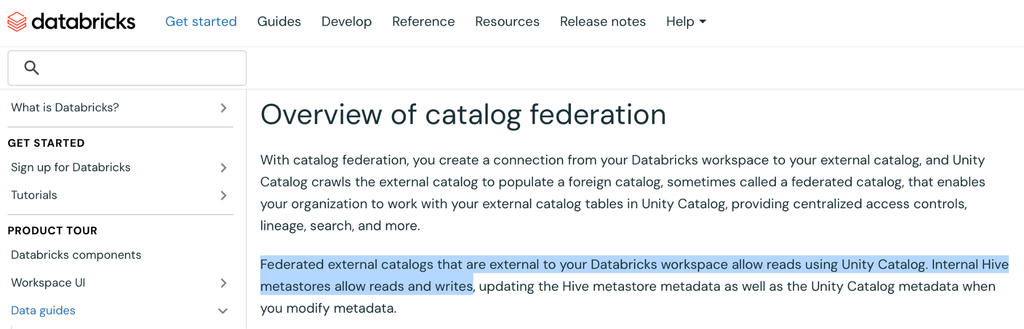
- Snowflake can both read and write directly to tables in external catalogs (such as AWS Glue and Unity Catalog) without copying data. In contrast, Databricks treats foreign catalogs as read-only and rejects DML operations like INSERT, UPDATE, or DELETE.
- Snowflake Horizon Catalog enforces row-level filters and column masking for external engines via the standard Iceberg REST API. Unity Catalog disables external write access as soon as fine-grained access control policies are applied to a table.
- Snowflake Horizon Catalog vends temporary, request-scoped credentials for table access. Databricks Unity Catalog uses standing storage credentials for foreign tables and halts credential vending when governance policies are active.
- Snowflake Horizon Catalog is built on Apache Polaris, a vendor-neutral top-level project under the Apache Software Foundation, whereas the open-source edition of Unity Catalog lacks the row filters, column masks, and ABAC that commercial Unity Catalog customers depend on.
Your data is stored as Apache Iceberg tables in AWS Glue. A Spark job enriches them overnight, Amazon Athena serves the ad-hoc questions, and the analytics team wants either Snowflake or Databricks to work on the same tables. Use the same data in place with no ETL, with any engine, and without any conversion hoops. This is a key value proposition of open table format.
We sought to answer the following questions:
- Can Snowflake and Databricks write to those tables, not only read them?
- Can you protect a column or filter a row once, and have that rule follow the data to either engine?
- If you decide next year to switch engines or catalogs, can you make the switch without copying a byte?
On Snowflake, the answer to all three is yes, by design. Snowflake reads and writes Iceberg tables that live in someone else’s catalog, and any engine that speaks the Iceberg REST protocol can read and write the Iceberg tables Snowflake manages. With Databricks Unity Catalog, the answers change the moment the data lives anywhere other than Unity Catalog. Tables governed outside Databricks are read-only. To change them, you copy them into Databricks. Easy in, but difficult out.
Why interoperability is the architecture decision
No enterprise can predict their analytical needs over the next decade. The only defensible architecture is one where data stays in open formats, governed by an open catalog, reachable by whatever engine that meets your needs.
Vendor lock-in is no longer a necessary evil but an actual risk. When data is bound to a single vendor’s runtime, three things happen:
- Migration costs balloon. You can’t move a workload without moving, rewriting, and re-securing the data under it.
- Power shifts to the vendor. A customer who can’t credibly leave has nothing to negotiate with.
- Innovation slows. Every new engine or model has to come through the vendor’s front door, with a conversion step and a compute bill attached.
Iceberg solved the data format part of this problem. The catalog is another part. A catalog decides who can see a table, who can change it, and which engines are allowed in. An open format behind a closed catalog is still a closed system.
Don’t accept lock-in as the price of governance.
Snowflake: open at every layer of the stack
Snowflake is interoperable at every layer of the stack.
- Formats. Snowflake provides Native Apache Iceberg and Apache Parquet, with no proprietary wrapper and no forced conversion. Iceberg can be the default table format for a database or an account.
- Catalog. Snowflake Horizon Catalog Catalog exposes Snowflake-managed Iceberg tables through the standard Apache Iceberg REST Catalog API and is built on Apache Polaris. Because engines talk to Snowflake through the standard REST specification, the same engines can be pointed at any other Iceberg REST catalog, including a self-hosted Apache Polaris on Docker or Kubernetes, without changing how they read metadata.
- Vendor-neutral stewardship. Snowflake donated Polaris to the Apache Software Foundation. In February 2026, Apache Polaris graduated to a top-level Apache project, governed by a multi-organization Project Management Committee. Snowflake does not control its roadmap.
- Read and write. Snowflake reads and writes Iceberg tables managed by external catalogs such as AWS Glue and Apache Polaris. External engines read and write Snowflake-managed Iceberg tables through Horizon Catalog, whether the files sit in the customer’s own cloud storage or in Snowflake-managed storage.
- Credentials. When an external engine reads or writes a Snowflake-managed Iceberg table, Horizon Catalog vends a temporary credential scoped to that table. Snowflake stays in the authorization path, every access is logged, and revoking access means removing a grant, not rotating a storage key.
- Governance that travels. Masking and row access policies defined in Snowflake are enforced for external engines that query Snowflake-managed Iceberg tables through Horizon Catalog.
The data is yours. The choice of engine, catalog, and cloud should be yours too.
Unity Catalog: open format, closed catalog
Databricks markets Unity Catalog as open: open formats, open APIs, catalog federation, and an open-source edition. The implication is that data placed under Unity Catalog stays usable by any engine. However, in reality it’s a different story:
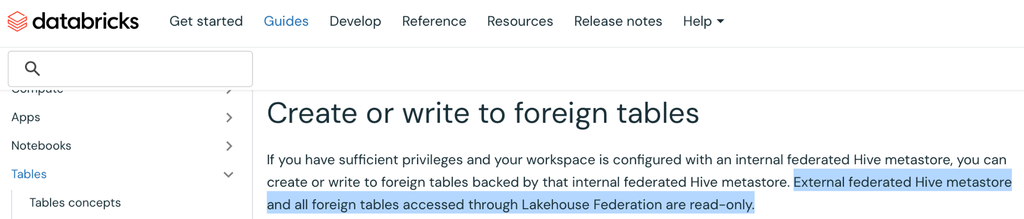
- Foreign tables are read-only. Databricks’ own documentation states that all foreign tables accessed through Lakehouse Federation are read-only. Federated Glue, external Hive metastores, and Snowflake catalogs can be read from Databricks but not written.
- Iceberg on Databricks requires Unity Catalog. To use Iceberg managed or foreign tables in Databricks, the catalog has to be Unity Catalog, and Unity Catalog is controlled by Databricks.
- No credential vending for foreign tables. Databricks documents that credential vending is not supported on foreign Iceberg tables. Catalog federation reads the files with a storage credential an administrator configures in Unity Catalog ahead of time, which gives Databricks standing access to the customer’s storage rather than access scoped to a single request.
- One supplier. No other vendor offers a managed Unity Catalog. The open-source edition sits at the Sandbox stage of Linux Foundation for open-source AI and data projects, the earliest of its four hosting stages, where a multi-organization technical steering committee is not yet required. Further, the open-source edition of Unity Catalog doesn’t include the row filters, column masks, or ABAC that commercial customers build on, which means the exit path leaves governance behind.
Unity Catalog locks in your data to their terms.
Our Central Focus
We framed four questions, each one narrowing the “open” claim a little further:
- Can each platform read the other’s Iceberg tables? The baseline every vendor claims.
- Can each platform write to, and transform into, a table governed by someone else’s catalog? The test that separates open from read-only.
- What happens to external access once a table is governed? Row filters and column masks are where openness usually ends.
- Can an open-source engine write to the platform’s own managed tables? No copy, no proprietary connector, nothing but the Iceberg REST specification.
The Test
We ran every test ourselves, on both platforms, in one AWS region (us-west-2): a Snowflake account, a Databricks workspace on Unity Catalog, an AWS Glue Data Catalog, and an Amazon S3 bucket. The SQL below is what we ran, with only account identifiers substituted.
- The data. An Iceberg table of raw web events (orders, page views, cart adds) with a JSON payload, created and loaded in Glue by Amazon Athena, plus small orders tables managed by Snowflake and by Unity Catalog.
- Four engines on one copy. Athena, Snowflake, Databricks, and open source Apache Spark all worked on the same Iceberg tables. Nothing was exported, converted, or copied between them unless a platform forced it.
- No proprietary connectors. Snowflake reached Glue through the Glue Iceberg REST endpoint and reached Unity Catalog through the Unity Catalog Iceberg REST endpoint. Spark reached each platform through that platform’s Iceberg REST endpoint.
Test 1: Read across catalogs
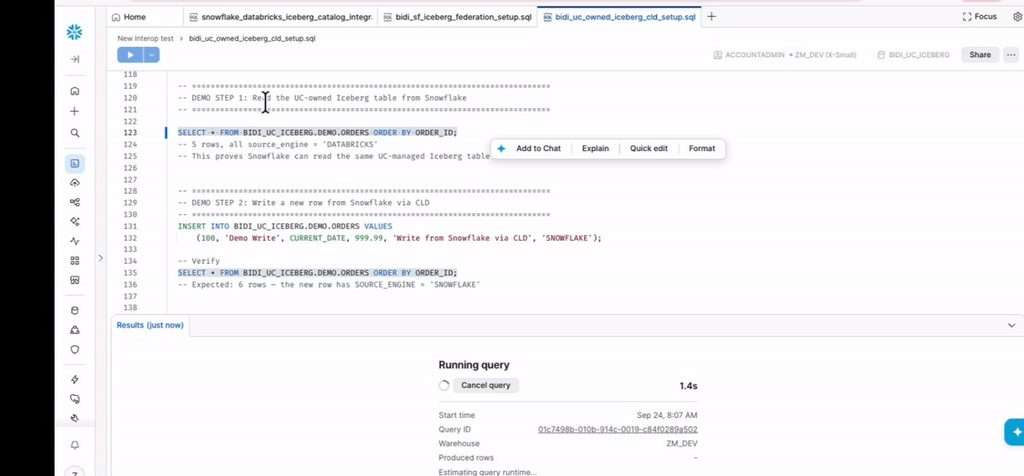
Reading across catalogs works on both platforms. Databricks read the Glue Iceberg tables through a Unity Catalog foreign catalog, including a table that Snowflake had written and then updated. Snowflake read a Unity Catalog managed Iceberg table through a catalog-linked database.
Test 2: Write back and transform
Snowflake writes to Glue. Snowflake connects to Glue through its Iceberg REST endpoint and links the Glue database as a Snowflake database. Every table in it is immediately queryable, with no copy and no migration:
CREATE CATALOG INTEGRATION glue_catalog_int
CATALOG_SOURCE = ICEBERG_REST
TABLE_FORMAT = ICEBERG
CATALOG_NAMESPACE = ‘glue_demodb’
REST_CONFIG = (
CATALOG_URI = ‘https://glue.us-west-2.amazonaws.com/iceberg’
CATALOG_API_TYPE = AWS_GLUE
CATALOG_NAME = ‘<aws_account_id>’
ACCESS_DELEGATION_MODE = EXTERNAL_VOLUME_CREDENTIALS )
REST_AUTHENTICATION = (
TYPE = SIGV4
SIGV4_IAM_ROLE = ‘arn:aws:iam::<aws_account_id>:role/<snowflake_role>’
SIGV4_SIGNING_REGION = ‘us-west-2’ )
ENABLED = TRUE;
CREATE DATABASE glue_linked_db
LINKED_CATALOG = ( CATALOG = ‘glue_catalog_int’,
ALLOWED_NAMESPACES = (‘glue_demodb’) )
EXTERNAL_VOLUME = ‘glue_extvol’;
SELECT * FROM glue_linked_db.glue_demodb.raw_events LIMIT 10;
Then Snowflake transforms the raw JSON events and writes the result back into Glue as a new Iceberg table:
CREATE ICEBERG TABLE glue_linked_db.glue_demodb.processed_orders (
event_id STRING, customer_id STRING,
order_total NUMBER(10,2), processed_at TIMESTAMP_NTZ(6));
INSERT INTO glue_linked_db.glue_demodb.processed_orders
SELECT event_id,
PARSE_JSON(payload):customer_id::STRING,
PARSE_JSON(payload):order_total::NUMBER(10,2),
CURRENT_TIMESTAMP()
FROM glue_linked_db.glue_demodb.raw_events
WHERE event_type = ‘ORDER’;
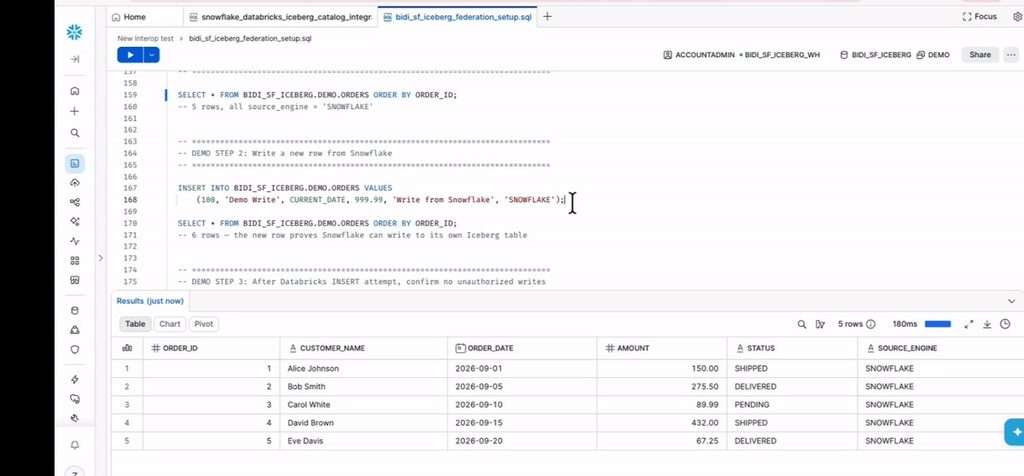
The five order events landed in Glue. We then ran an UPDATE, a MERGE that inserted a new order, and a DELETE from Snowflake against the same Glue table, and queried it from Athena. Athena saw every change. The table never left Glue, and Glue remained the catalog of record throughout.
Snowflake writes to Databricks, too. We pointed Snowflake at Unity Catalog’s own Iceberg REST endpoint, linked a Unity Catalog schema as a Snowflake database, and ran an INSERT and an UPDATE against a Databricks-managed Iceberg table. Databricks SQL saw both changes immediately. Snowflake writes into Glue and into Unity Catalog, in place.
Databricks cannot write back. We connected the same Glue database to Unity Catalog as a foreign catalog. Databricks read both tables. Then we ran the same kind of write Snowflake had just run. INSERT, UPDATE, and DELETE all failed with the same message:
PERMISSION_DENIED: Only READ credentials can be retrieved for foreign tables.
INSERT failing could be dismissed as “just DML,” so we also ran the way data engineers actually build datasets, CREATE TABLE AS SELECT into the Glue foreign catalog:
CREATE TABLE glue_federation_catalog.glue_demodb.dbx_processed AS
SELECT event_id,
get_json_object(payload, ‘$.customer_id’) AS customer_id,
CAST(get_json_object(payload, ‘$.order_total’) AS DECIMAL(10,2)) AS order_total,
current_timestamp() AS processed_at
FROM glue_federation_catalog.glue_demodb.raw_events
WHERE event_type = ‘ORDER’;
This one “succeeded,” but that is actually worse. The new table appears under the Glue catalog’s name in Databricks, but it is a Delta table, not Iceberg, stored in Databricks-managed storage. Glue has no record of it. Athena returned TABLE_NOT_FOUND, and Snowflake’s link to the same Glue database never saw it. The engineer asked for a table in Glue and got a copy in Databricks.
That is a forced copy. The only place transformed data can land is Databricks storage, which means a second copy of the data, a second set of pipelines to keep it fresh, and Databricks compute to run them. Databricks’ documentation confirms the behavior: foreign tables accessed through Lakehouse Federation are read-only, for Glue and Hive metastores as well as Snowflake.
Test 3: Governance
Databricks’ answer to Test 2 is to move the data into Unity Catalog managed Iceberg tables, which external engines can reach through Unity Catalog’s Iceberg REST endpoint. We tested that answer, and it works, until the table is governed.
- Ungoverned, it is open. Open-source Spark, using only the credentials Unity Catalog vended, read a Unity Catalog managed Iceberg table and inserted a row into it.
- Governed, the door closes. We added a one-line row filter in Databricks. The same Spark read, by the same user, then failed at storage access, even on the configuration Databricks documents for cross-engine ABAC (a managed table with catalog commits, Spark 4.0, Iceberg 1.11). The write was refused outright: “Cannot write to the table with fine-grained access control policies unless the principal is exempted.”
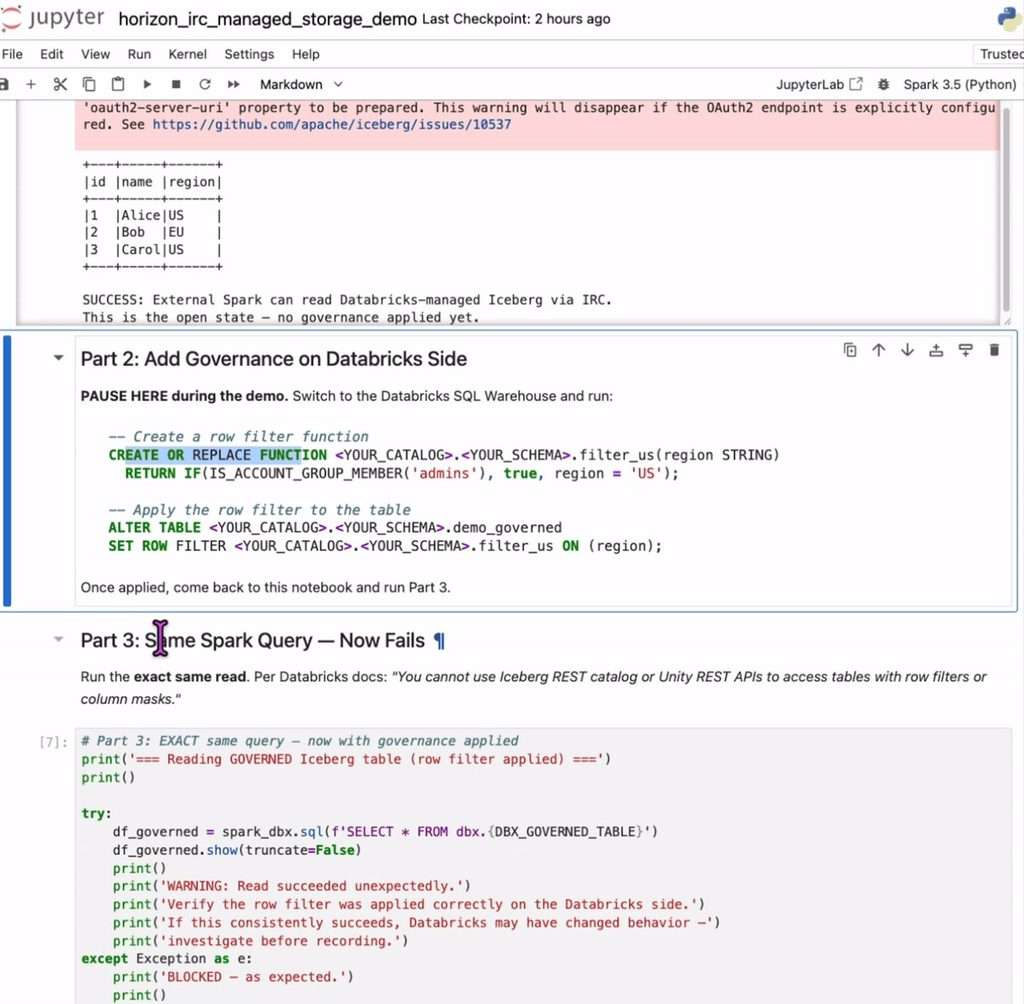
Databricks’ remedy is cross-engine ABAC, and its own documentation spells out the terms. To write, the principal must be exempted from the policy. Managed tables with catalog commits only, so foreign tables, the ones that stay in your own catalog, get no fine-grained governance from Unity Catalog. Between governance and openness, Unity Catalog makes you choose. Customers pay for governance by locking themselves in.


Snowflake Horizon Catalog takes the opposite approach. Masking and row access policies defined once in Snowflake are enforced for external engines through Horizon Catalog, both through the Snowflake Connector for Spark, which supports reads and writes on policy-protected tables, and through the Iceberg REST Scan Plan API for any engine that supports it. Every external access is recorded in Snowflake’s ACCESS_HISTORY, tagged with the Horizon Catalog REST endpoint as its source.
Test 4: Any engine writes to Snowflake-managed Iceberg
The last test holds Snowflake to the bar we set for Unity Catalog. Open-source Apache Spark, configured with nothing but the standard Iceberg REST catalog settings and pointed at the Horizon Catalog endpoint, read a Snowflake-managed Iceberg orders table:
spark = (SparkSession.builder
.config(“spark.sql.catalog.snowflake”, “org.apache.iceberg.spark.SparkCatalog”)
.config(“spark.sql.catalog.snowflake.type”, “rest”)
.config(“spark.sql.catalog.snowflake.uri”,
“https://<account>.snowflakecomputing.com/polaris/api/catalog”)
.config(“spark.sql.catalog.snowflake.header.X-Iceberg-Access-Delegation”,
“vended-credentials”)
.config(“spark.sql.catalog.snowflake.warehouse”, “<database>”)
.getOrCreate())
spark.sql(“SELECT * FROM snowflake.DEMO.ORDERS_DEMO ORDER BY order_id”).show()
Spark returned the five Snowflake-written rows. Then Spark wrote to the table through the same endpoint:
spark.sql(“””INSERT INTO snowflake.DEMO.ORDERS_DEMO VALUES
(100, ‘Spark External User’, DATE ‘2026-10-28’, 999.99,
‘PENDING’, ‘SPARK_VIA_IRC’)”””)
spark.sql(“UPDATE snowflake.DEMO.ORDERS_DEMO SET status = ‘SHIPPED’ WHERE order_id = 3”)
Both commits landed. Snowflake queried the table and saw the Spark-written row and the Spark-updated status. We ran it twice: once on a table in Snowflake-managed storage and once on a table in our own S3 bucket. Both worked the same way. Horizon Catalog vended a short-lived credential for each request, Spark wrote the data files directly, and Snowflake compute was never in the write path. No copy, no proprietary connector, no Snowflake bill for someone else’s engine.
Side by Side
| Databricks Unity Catalog | Snowflake | |
| Read tables in another catalog | ✅ Yes, through Lakehouse Federation | ✅ Yes, through catalog-linked databases |
| Write tables in another catalog | ❌ No. INSERT, UPDATE, and DELETE on Glue tables denied | ✅ Yes. CREATE, INSERT, UPDATE, MERGE, and DELETE into Glue, verified from Athena; INSERT and UPDATE into Unity Catalog, verified from Databricks |
| Where transformed data can land | ⚠️ Only Databricks storage. CTAS into the Glue catalog produced a Delta table Glue never saw | ✅ In the customer’s catalog of choice |
| External engines on managed tables | ⚠️ Read and write until a row filter is applied, then no storage credentials and no writes | ✅ Read and write through the standard Iceberg REST API |
| Fine-grained governance for external engines | ❌ Managed tables only, reads only, filtered on billed Databricks serverless compute | ✅ Masking and row access policies enforced through Horizon Catalog, with every access logged |
| Credentials | ❌ No credential vending for foreign tables; federation uses an admin-configured storage credential | ✅ Temporary, table-scoped credentials vended per request; revoke with a grant |
| Catalog stewardship | ⚠️ Databricks controls commercial and open-source editions; OSS edition at LF AI & Data Sandbox, without commercial governance features | ✅ Built on Apache Polaris, an Apache top-level project |
| Transition to another engine | ❌ Copy the data out of Databricks storage | ✅ Point the new engine at the Iceberg REST catalog |
Conclusion
Here are the key takeaways about Databricks Unity Catalog:
- Iceberg is an open table format, but Unity Catalog is a closed catalog.
- Data that Databricks manages is reachable from outside, until it is governed.
- Data that Databricks does not manage can be read but never changed.
- The only path to writing, transforming, or governing data from Databricks runs through a copy into Databricks storage, and every copy makes the decision to use another engine more expensive.
- Databricks Unity Catalog leads to vendor lock-in.
Snowflake takes the opposite position at every layer:
- Fully open format and catalog
- An Iceberg REST catalog built on a vendor-neutral Apache project
- Reads and writes in both directions with Glue and open-source Spark
- Short-lived credentials instead of standing ones
- Governance defined once and enforced wherever the data is queried
In our own tests, Snowflake wrote into Glue and into Unity Catalog in place, and open-source Spark wrote into Snowflake. Databricks could not write into anyone’s catalog but its own.
Since the data is yours, the choice of tools, clouds, and models should be yours too. Snowflake is already architected to deliver that today.
FAQs
Can both Snowflake and Databricks read Iceberg tables managed by external catalogs?
Yes, both platforms support reading Iceberg tables hosted in foreign catalogs like AWS Glue. Databricks reads them via Lakehouse Federation, whereas Snowflake connects directly using catalog-linked databases.
Can Databricks write back or transform data in external catalogs?
No, Databricks enforces strict read-only limits on foreign tables and denies operations like INSERT, UPDATE, or DELETE. Any attempt to write transformed data creates a forced Delta copy stored inside Databricks storage rather than in the target catalog.
How does Snowflake handle writing to external catalogs?
Snowflake writes and transforms data directly in external catalogs such as AWS Glue and Unity Catalog without copying files. These updates are saved in place and instantly visible to other analytical engines querying those catalogs.
What happens to external write access when fine-grained security policies are applied?
In Databricks Unity Catalog, applying a row filter halts storage credential vending and blocks external engines from writing to the table. In contrast, Snowflake Horizon Catalog enforces column masking and row access rules through standard Iceberg REST APIs while maintaining external read and write access.
Can open-source engines like Apache Spark write directly to Snowflake-managed tables?
Yes, open-source Spark can query and write directly to Snowflake-managed Iceberg tables using standard Iceberg REST catalog configurations. Horizon Catalog vends temporary, scoped storage credentials so the external engine writes files directly without incurring Snowflake compute charges.
Methodology Notes
- Environment. All tests run by McKnight in AWS us-west-2: a Snowflake account, a Databricks workspace (Unity Catalog, serverless SQL warehouse), an AWS Glue Data Catalog, and one S3 bucket. External Spark ran on a laptop with no AWS credentials of its own available to Iceberg, so every storage access used credentials vended by the catalog under test.
- Snowflake and Glue (Test 2). Snowflake connected through the Glue Iceberg REST endpoint with SigV4 authentication and an external volume for data access. Our catalog integration also set SIGV4_EXTERNAL_ID to reuse an external ID already trusted by our IAM role. Otherwise, the integration’s generated external ID is added to the role’s trust policy. The raw_events table was created and loaded by Amazon Athena. Athena verified every Snowflake write. CREATE TABLE AS SELECT into a Glue catalog-linked database is not supported in Snowflake today (error 093664), so the transform uses CREATE ICEBERG TABLE followed by INSERT. Still a solid workaround.
- Snowflake and Unity Catalog (Tests 1 to 3). Snowflake connected to the Unity Catalog Iceberg REST endpoint with vended credentials. Unity Catalog vends credentials only when the principal holds EXTERNAL USE SCHEMA on the schema.
- Databricks and Glue (Tests 1 and 2). Unity Catalog foreign catalog over an AWS Glue connection, with authorized paths and a storage root. Without a storage root, Databricks treated the Glue Iceberg tables as Hive tables and could not read them.
- Governance (Test 3). Spark 3.5 with Iceberg 1.9.1, and Spark 4.0 with Iceberg 1.11.0 (the versions Databricks lists for cross-engine ABAC), authenticated with a Databricks personal access token. Both behaved identically. We did not configure cross-engine ABAC server-side planning, but its terms are taken from Databricks’ documentation (updated October 2026).
- Spark and Horizon Catalog (Test 4). Apache Spark 3.5 with Iceberg 1.9.1, authenticated to Horizon Catalog with a Snowflake programmatic access token restricted to one role. Horizon Catalog vends write credentials to the table’s owner role; a role with only INSERT and UPDATE privileges received read-only credentials. External engines cannot run CREATE TABLE AS SELECT against Horizon Catalog; tables are created first and then written.
